

If you want to exclude AI from search results, you can use the Web tab, switch search engines, or filter specific domains. It's not perfect, but it gives you more control.

I like generative AI.
I use it almost daily. It helps me brainstorm, outline, summarize, translate, and occasionally polish my German-English hybrid into something that resembles proper English. For that, I'm grateful.
But over the last year, I've also learned that AI has limits. Especially when it comes to recipes.
Not long ago, I tried to veganize a cake recipe using tips from ChatGPT. The suggestions sounded reasonable so I gave it a try. But the result didn't work as expected, I got a similar result as with my attempts pre-AI experiments. I felt slightly betrayed. Mighty AI is not so mighty after all?
Around the same time, I read food blogger Adam Gallagher describing AI recipes as "Frankenstein" creations. That felt… accurate. Those recipes look convincing. But they lack the most important part: The human experience. The "Oops, that didn't work. Let's try again." testing part.
I'm not an AI expert. But I want to choose when to use AI, and when not to. I want to have a say in whether I like to see AI overviews in my Google search results or not. I want Google to stop deciding things for me. If you've ever had similar thoughts, you probably know what I mean.
In This Post:
Why AI Generated Recipes Fail
In a strange way, it makes sense. AI doesn't stand in a kitchen. It doesn't test a batter 5 times to ensure a perfect crumb. AI pulls patterns from thousands of recipes and assembles what looks like a smart, statistically solid version.
In theory, it works. In practice, you sometimes get what Adam Gallagher calls a "Frankenstein recipe." They look convincing, but the human part of it all is missing.
This is especially true for baking. Stews forgive you. Cakes don't. A small swap can change everything. You need to trust the recipe creator and then adhere to the baking instructions as best you can.
That said, I still use AI in the kitchen, just differently.
If I find a lonely carrot, a turnip, and two celery stalks in my fridge, AI is great for brainstorming. But then I ask for recipe links. Because behind every recipe, there's someone who went grocery shopping, cooked, tested, adjusted the recipe, and cleaned the kitchen afterward (multiple times).
As a food blogger who has tested hundreds of recipes over the years, I know how much invisible work goes into one small post.
And beyond quality and proper crediting, there's another important aspect: energy use. Generating AI content is not lightweight. In fact, it's anything but environmentally friendly. I'll come back to that in a moment.
Google Search Is Showing More AI Generated Content
So, yes, AI (food) content can be useful, but it's not always trustworthy. And that's why I want to be in control over the exposure to it.
Lately, the bigger issue for me isn't recipes. It's search.
Do a Google search and you'll often see an AI Overview at the top. Then videos. Visual summaries. "People also searched for." The results page feels so busy and cluttered lately.
And slightly unpredictable.
The other day, I tried a small experiment:
- I searched for "dalgona coffee."
→ AI Overview at the top.

- Then I searched for "dalgona coffee recipe."
→ No AI Overview.
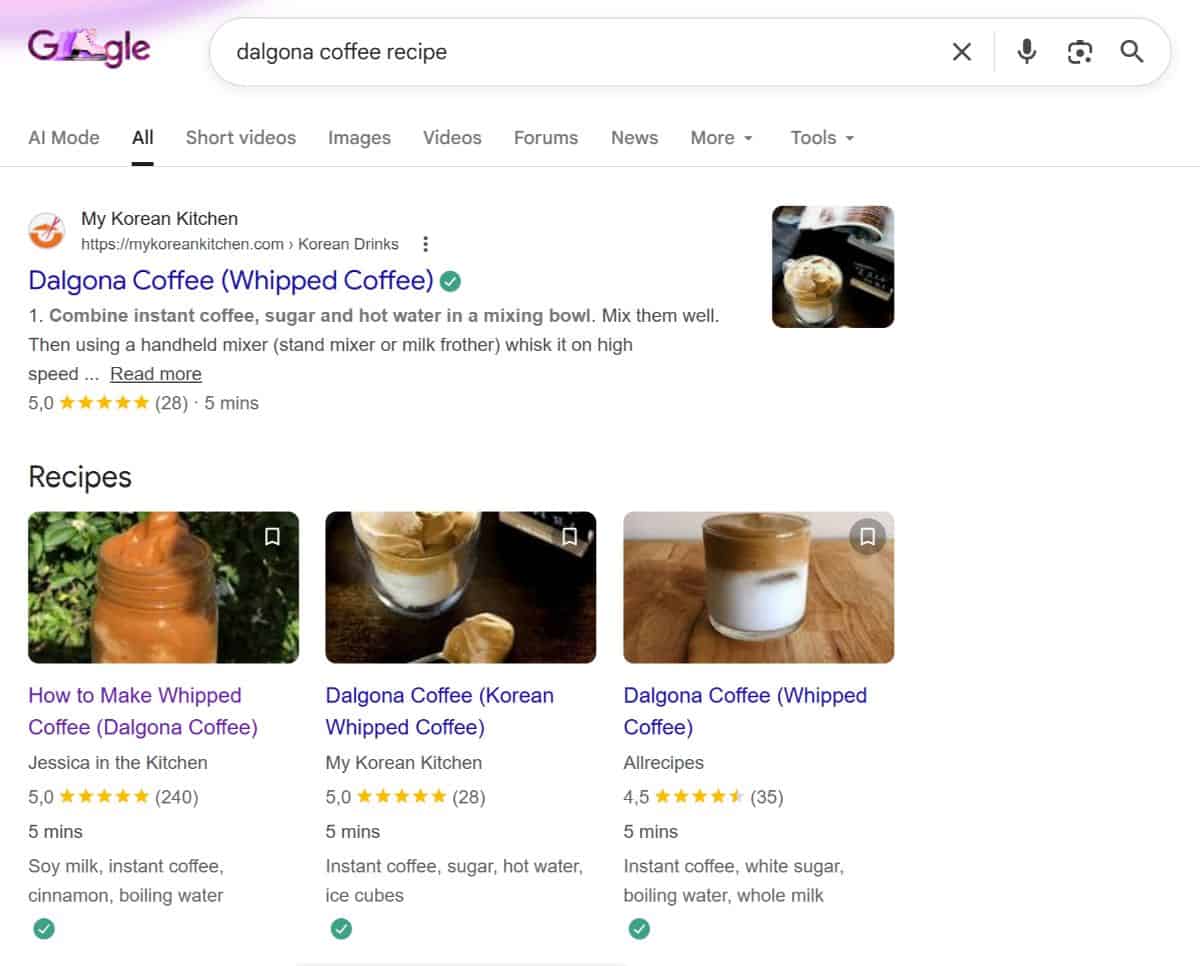
Maybe Google assumes one is informational and the other is practical? Maybe the algorithm just felt like switching things up. It's hard to know … and it could change tomorrow anyway.
What I do know is that I sometimes prefer an old-school results page. Remember the clean list of just website links with little pictures next to them? That's the one. The one that feels so calm, it's almost boring. But in a good way.
How to Exclude AI Results in Web Search
Wouldn't an "AI off" button be lovely? Unfortunately, there isn't one. At least not in Google. You can't completely exclude AI from search results.
But you do have options.
Use an Alternative Search Engine
If you want fewer AI summaries by default, consider switching search engines.
Ecosia tends to rely less on AI-generated overviews and focuses heavily on sustainability. It also offers more control in its settings if you like to tweak things.
DuckDuckGo goes a step further. In the settings, there's an "AI Features" section where you can limit or switch off most AI elements entirely. That level of transparency feels almost radical right now.
Tips for Excluding AI From Google Search
Google doesn't offer a clean "AI off" switch.
But there are workarounds for you to nudge the results in your favor.
- Use the Web Tab
This is the simplest workaround.
After you search, click the "Web" tab in the panel below the search box (sometimes hidden under "More"). It strips away most extras and shows traditional website links.
If you find yourself using it often, bookmark the Web-tab version of Google so you can start there directly: https://www.google.com/search?q=%s&udm=14
Caveat: This is not an official feature and Google could change it anytime. But for now, it's the closest thing to a classic search results page.

- Exclude Specific Sites With -site:
You can remove individual domains from your results by adding:
-site:example.com
For example, if you'd like to exclude ChatGPT input when searching for dalgona coffee:
dalgona coffee -site:openai.com
You can stack multiple site exclusions if needed.
This doesn't eliminate AI-generated content entirely, but it removes certain sources.
- -ai Doesn't Work the Way You Think
I've seen advice to add -ai to your search input.
The idea is that this parameter filters out AI content.
In reality, it only removes pages that literally include the word "AI." That means it can hide content you actually want to see (including posts like this one) while leaving AI summaries untouched.
So, while it might reduce obvious AI-branded pages, it doesn't turn AI off.
Why This Also Matters for Sustainability
Aside from the annoyance of AI overviews in search results and the risk that original authors don't get the credit they deserve, there's another important aspect: sustainability.
You've probably heard that AI systems require a lot of computing power. The energy demand is high, no matter what kind of content is being generated or where the generation happens. Some estimates suggest that a generative AI query can use several times (even up to 5-10 times) the electricity of a traditional search. That might not sound like much per se, but multiply that by millions of queries a day and then it adds up.
You see, there are plenty of reasons to use AI more intentionally. And to default back to a classic Web search experience now and then. It's lighter on the system … and maybe a little lighter on our brain, too.
What's your experience? Have you found ways to exclude AI from search, or do you prefer it? I'm curious.
Other Posts You Might Like
- Why "Marry Me" Recipe Titles Are Problematic
- Mindful Eating: Slow Down and Enjoy Your Food
- What's Your Signature Birthday Cake?
- The 11 Hottest Cookbooks of 2024
Cheers,
Ramona
♥




Write a Comment